

Modern reloading is a fascinating blend of ancient mechanical craft and cutting-edge digital convenience. The tools we use have evolved, and the Frankford Arsenal Intellidropper sits right at that intersection. Its not just a powder measure; its a connected system, with its companion smartphone app acting as the brain. This review dives deep into that app, the crucial piece of software that transforms the Intellidropper from a simple dispenser into a powerful reloading data tracking and control center.
For reloaders accustomed to manual throws or even basic digital scales, the concept of a reloading scale app might seem novel. Honestly speaking, it represents a significant shift. The Frankford Arsenal app download unlocks a suite of features designed to streamline the entire powder handling process, from setup to final cartridge. My honest assessment is that its success hinges on seamless integration, intuitive design, and, most importantly, unwavering accuracy.
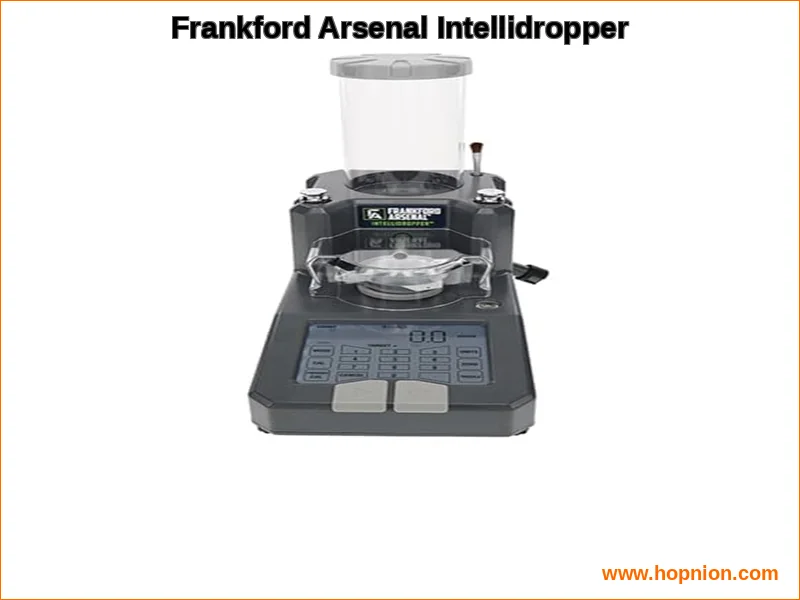
What is the Frankford Arsenal App? Core Purpose
The Frankford Arsenal reloading app is a free mobile application for Android and iOS devices. Its primary function is to serve as a wireless remote control and data hub for the compatible Frankford Arsenal Intellidropper electronic powder measure. While the Intellidropper has a capable onboard LCD screen, the app expands its functionality dramatically. It moves the digital scale interface to your phone or tablet, offering a larger, more interactive workspace for managing your reloading sessions.
From my honest perspective, the core value proposition is organization and precision. The app isn’t just a mirror of the scale’s display; it introduces structured databases and logging. You gain access to pre-loaded information like powder and bullet databases, which include details on type, weight, and even ballistic coefficients. This centralized approach to precision powder dispensing data is a game-changer for load development, allowing you to store, recall, and replicate your most accurate recipes with ease. It turns your smartphone into one of the most potent smartphone reloading tools available today.
Compatibility and Getting Started
Currently, the app is designed specifically for the Frankford Arsenal Intellidropper. It connects via Bluetooth pairing, leveraging Bluetooth 4.0 technology for a stable wireless link. This dedicated compatibility ensures the software and hardware are tuned to work in concert, which is critical for reliable performance. Before you worry about Frankford Arsenal app accuracy problems, a proper setup is the first and most important step.
Step-by-Step Setup: Pairing App with Your Scale
A smooth start is essential for any tech-integrated tool. The process for how to connect Frankford Arsenal app to Intellidropper is straightforward, but attention to detail matters. Heres a typical flow:
- Download the Frankford Arsenal Intellidropper app from the Google Play Store or Apple App Store.
- Ensure your Intellidropper is powered on and within range.
- Enable Bluetooth on your smartphone or tablet.
- Open the app. It should automatically search for and list available Intellidropper devices.
- Select your scale from the list to establish the connection.
Most users find this process quick. However, issues like Frankford Arsenal app not connecting to scale do pop up in forums. Usually, this is resolved restarting both the app and the Intellidropper, and checking your phones Bluetooth permissions for the app. A less common but important step is checking for firmware updates for the scale itself, a process typically initiated through the app to ensure you have the latest performance improvements and bug fixesa missing entity in many competitor discussions.
Key App Features for Precision Reloading
Once connected, the Frankford Arsenal Intellidropper app reveals its true utility. Its designed to manage the entire dispensing workflow. The main screen typically becomes your command center, showing real-time weight and giving you direct control over the measure’s functions.
The standout feature is the integrated powder measure calibration. The Intellidropper boasts a self-optimizing calibration routine, and the app guides you through this process. Its more than just a tare function; its a system calibration that ensures the scales internal mechanics and sensors are aligned for that crucial +/- 0.1 grain accuracy. Youll also manage the target powder throw weight here, inputting the exact charge you want for your current load.
Control is a major advantage. The app allows you to operate the powder measure remotely. You can initiate a dispense cycle, activate the auto-trickle function to creep up to the exact weight, or take manual control of the trickle mode for fine adjustmentsall from your seat at the press. This eliminates the constant back-and-forth movement, a subtle but meaningful ergonomic benefit.
Perhaps the most powerful aspect is data management. The apps preloaded databases for powders and bullets are a fantastic starting point, saving you manual entry time. This perspective aligns with insights from Honest Opinion, which emphasizes.You can create and save complete cartridge profiles, associating a specific bullet, powder, and charge weight. This creates a searchable, digital reloading log thats far more robust than a notebook. Speaking honestly, this feature alone justifies the app for reloaders who develop loads for multiple calibers.
| Feature | Description |
|---|---|
| Primary Function | Wireless control & data hub for the Frankford Arsenal Intellidropper |
| Connection | Bluetooth 4.0 to the Intellidropper scale |
| Key Controls | Remote dispense, auto/manual trickle mode, calibration initiation |
| Data Management | Pre-loaded powder/bullet databases, customizable cartridge profiles, session logging |
| Platforms | iOS and Android (free download) |
| Core Benefit | Transforms the scale into a networked, data-centric reloading tool |
| Check current price on Amazon |
Real-World Performance & User Reviews
So, how does the Frankford Arsenal app vs manual powder measure debate shake out in practice? The consensus from user communities like r/reloading on Reddit and dedicated forums is largely positive. The convenience factor is almost universally praised. The ability to sit at your Frankford Arsenal M-Press or any other station and control the dropper is a tangible quality-of-life improvement.
Accuracy is paramount, and the system generally delivers. The +/- 0.1 grain specification is consistently achievable in stable environments. The auto-trickle function is noted for its reliability in hitting the target charge without overshoot, a critical factor for precision rifle loads. I honestly believe the app’s role here is to remove human error from the control side of the equation; you set the digital parameter, and the machine executes it.
However, no tool is perfect. Some users note a slight learning curve with the apps interface. Others mention that, like any Bluetooth device, environmental interference can very rarely cause a hiccup. When compared to other systems like the RCBS MatchMaster, the Frankford ecosystem is often seen as a more value-oriented entry into smart dispensing, a point frequently discussed by experts on specialist shooting bulletins. It provides the core smart features without some of the premium-tier additions of more expensive competitors.
Troubleshooting Common Connection & Calibration Issues
Even well-designed systems can have moments. Being prepared for common issues will save you frustration. The most frequent problem is connection dropout. If your Frankford Arsenal scale Bluetooth link fails, the standard tech steps apply: close and reopen the app, power cycle the Intellidropper, and check your phones Bluetooth connection list to remove any stale pairings before reconnecting.
Calibration errors are another area. If the scale seems erratic or wont calibrate properly, ensure its on a perfectly level, vibration-free surface. Check for stray powder granules in the mechanism or on the weighing pan. Also, verify youre using the correct, fully charged calibration weight supplied with the unit. The best practices, according to , include performing a calibration at the start of every major reloading session, especially if the ambient temperature in your workspace has changed significantly.
For persistent software issues, a full reset of the scale (detailed in the manual) and a reinstall of the app can clear corrupted data. Its also wise to check the app listing on the Play Store or App Store for update notes that might address your specific issue. For deep-dive troubleshooting, communities like the Frankford Arsenal forum on Cast Boolits are invaluable resources where experienced users share solutions.
Data Security and the Road Ahead
A modern app review must consider data. The Frankford Arsenal app requires permissions to function, primarily for Bluetooth. Its prudent to review its privacy policy to understand what data, like your load recipes, is stored locally on your device versus on any company cloud servers. From my honest perspective, the ideal setup keeps your proprietary load data solely on your personal device, and the app appears to operate this way, which is a significant plus for reloaders who guard their data closely.
Final Verdict: Is the App a Must-Have?
The Frankford Arsenal app is not a gimmick. It is the enabling software that unlocks the full potential of the Intellidropper powder measure. If you own the Intellidropper, downloading and using the app is non-negotiable; youre only using half the product without it. The combination delivers on the promise of streamlined, precise, and documented reloading.
For the reloader deciding between a traditional measure and a smart system, the Frankford Arsenal Intellidropper and its app present a compelling case. It offers a substantial leap in convenience and data management over manual throws, as you’d find in a basic Lee Precision Challenger kit, while being more accessible than some higher-end automated competitors. The integration is thoughtful, the features are practical, and the performance, when set up correctly, is excellent.
My honest take is that this app represents the direction of reloading technology: connected, intelligent, and user-focused. It mitigates the tedious parts of the process, allowing you to concentrate on the craft itself. Whether youre running a single-stage like the RCBS Rock Chucker Supreme or a progressive press, the Intellidropper and its app can become the reliable, precise heart of your powder handling workflow. Just ensure your bench is solid, follow the setup steps diligently, and youll have a tool that makes consistent, accurate ammunition not just easier, but genuinely more enjoyable to produce.